
NetworkAccess · Optical Fibre Network
Build the optical backbone.
Plan, document and manage your optical fibre infrastructure end to end, from trunk routes and splice points to the live inventory that operations depends on.
Get a demo →Why it matters
From route plan to live fibre inventory.
One connected workspace for designing, documenting and managing optical fibre infrastructure. The plan you draw, the splices you record and the inventory operations reads are the same record, so the network on the map matches the fibre in the ground.
What it covers
One connected workspace.
Route planning
Design trunk routes and branch spurs across territories from one workspace.
Splice and span records
Capture every splice, span and termination with field-grade accuracy.
Fibre inventory
A single source of truth for cores, ducts and capacity across the network.
Lifecycle management
Track changes, faults and capacity as the fibre network evolves.
The plant, layer by layer, over the street it runs under
The workspace draws the fibre plant on the live basemap rather than on a schematic. Ducts, micro-ducts, handholes, cabinets, couplers, splitters and patch panels each sit on their own layer, so a planner can bring up only the objects that matter to the question in front of them.
Each cable carries its own record on the map, the fibre count and whether the run is underground or overhead, so the span you are looking at is the span the field crew will open.
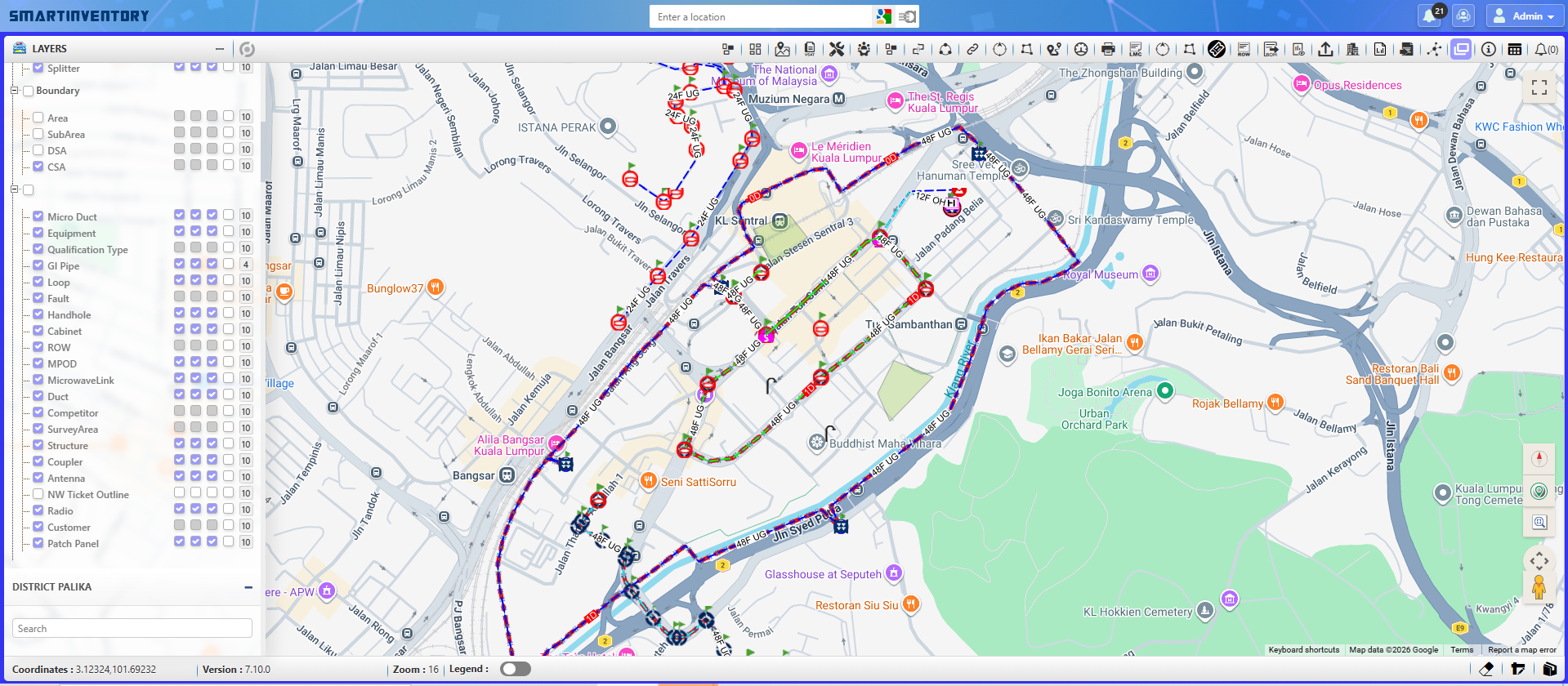
One connected fibre network, documented to the metre.
Every trunk, span and splice resolves into a single managed graph, so the optical fibre network on the map is the one your field and operations teams actually run.
Part of NetworkAccess
The map is the interface.
Optical Fibre Network is part of NetworkAccess, the operations-first platform for fibre and broadband. The same fibre inventory feeds network inventory, drives serviceability decisions and turns each FTTx rollout into a network you can operate.
See it manage your fibre network.
Walk through trunk planning and live fibre inventory with our team.
Get a demo →